Understanding Return to Sender (RTS): Process, Eligibility, and Next Steps
Last updated: July 15, 2026
When a package cannot be delivered and is marked as Return to Sender (RTS) or Undeliverable, it's important to understand what happens next, whether a claim is possible, and how to handle reshipment. This article covers the full RTS process.
What Happens When a Package Is Marked RTS?
When a carrier marks a shipment as Return to Sender (or Undeliverable), the package is routed back through the carrier's network toward the Manifest warehouse. Once delivered, the returned package enters our returns department for processing in Two Boxes and will be added back to inventory. The source of the truth for the status of a return is in Two Boxes following successful processing.
IMPORTANT NOTE: return transit can take additional time depending on the carrier and the package's current location.
How to Search for Returns in Two Boxes
Click Returns on the right navigation

Make sure any existing Filters are cleared
In the Search Bar, type in the order #, tracking #, or customer email
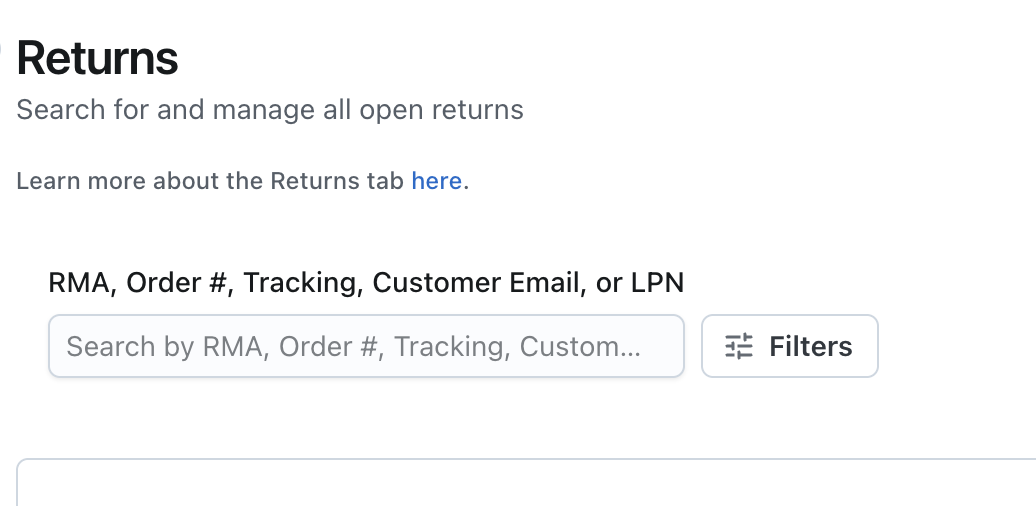
Hit enter on your keyboard to yield the search results*
*IMPORTANT: if you're not seeing a record of that return in Two Boxes, first try searching by another identifier (if you searched order #, try tracking or customer email).
Are RTS Orders Eligible for a Claim or Reimbursement?
Once an order is marked as Returned to Sender or Undeliverable, it is not eligible for a claim or reimbursement. This applies even if the shipping address was correct.
However, there are some exceptions:
Lost RTS shipments: If a package was marked as RTS but has never arrived back at the Manifest warehouse and tracking shows no movement for an 15+ days, it may qualify as a lost-in-transit claim. In these cases, you can submit a lost package claim as here.
Undeliverable with no RTS initiated: If the tracking shows "Undeliverable" but there is no indication the package is being returned to sender, the shipment may be eligible for a reimbursement. Please refer to our Shipping Claims guide for eligibility details.
Claims must be filed within 30 days of the ship date (or in this case, the return to sender date tracking event date). Orders shipped more than 30 days ago are not eligible for reimbursement, and exceptions cannot be made.
What If the Package Was Marked RTS But Never Returned to the Warehouse?
If tracking shows the package was returned to the carrier's facility or a consolidation center (e.g., Montebello, CA) but has not yet arrived at the Manifest warehouse, our team will follow up with the carrier to investigate. This process can take time and we will keep you apprised of updates from the carrier as we receive them. Once the package is physically received at our warehouse, it will be processed and added back to your inventory.
How to Request a Return to Sender (RTS)
If you need a package intercepted and returned to the warehouse (for example, because a replacement was already sent), you can contact our team with the order number and tracking number to request an RTS. We will reach out to the carrier on your behalf. Please note that while we will always make every effort to accommodate such requests, RTS intercepts cannot always be guaranteed.
How to Reship an RTS Order
Our shipping claims policy covers the insured retail value of lost or damaged shipments — replacements or reshipments are not covered under the claims process. If you would like to resend an item to your customer after an RTS, you have two options:
Wait for the returned item to be received and processed back into your inventory, then reship the order directly in ShipHero or create a brand new order.
Send a replacement from your end immediately if the customer needs the item sooner.
Before reshipping, we recommend reviewing the reason for the original RTS using the tracking link and verifying or correcting the shipping address with your customer to avoid another return.
How to File a Shipping Claim
To file a shipping claim for an eligible shipment, please refer to the following resources:
Summary
Scenario | Eligible for Claim? | Next Step |
Package marked RTS and returned to warehouse | No | Inventory restocked; reship if needed |
Package marked RTS but never received at warehouse | Possibly (lost in transit) | Contact support; provide invoice to file claim |
Package marked Undeliverable with no RTS initiated | Possibly | Review Shipping Claims guide; submit claim if eligible |
Order shipped more than 30 days ago | No | Outside claims window; no exceptions |
Reminder: utilize Two Boxes as the source of truth for returns processing status.
If you still have questions about a specific shipment, please contact our team with the order number, tracking number, and carrier so we can investigate further!