Connect Redo to Two Boxes
Last updated: October 20, 2026
Manifest uses Two Boxes to process every return that comes back to our warehouse. If you use Redo for returns, connecting it to Two Boxes lets each return you approve in Redo show up in our system automatically, so our team can receive, inspect and update it without anything being keyed in by hand.
What we need from you
Two things, both from your Redo admin portal.
An API bearer token you create in Redo, which Two Boxes uses to talk to your Redo account
Your Redo Store ID
You don't need to create a webhook secret. Two Boxes generates it when we set up the integration on our side.
How to set it up
Step 1. Create an API client in Redo
Log in to your Redo Returns admin portal as an admin.
Go to Settings > Developer.
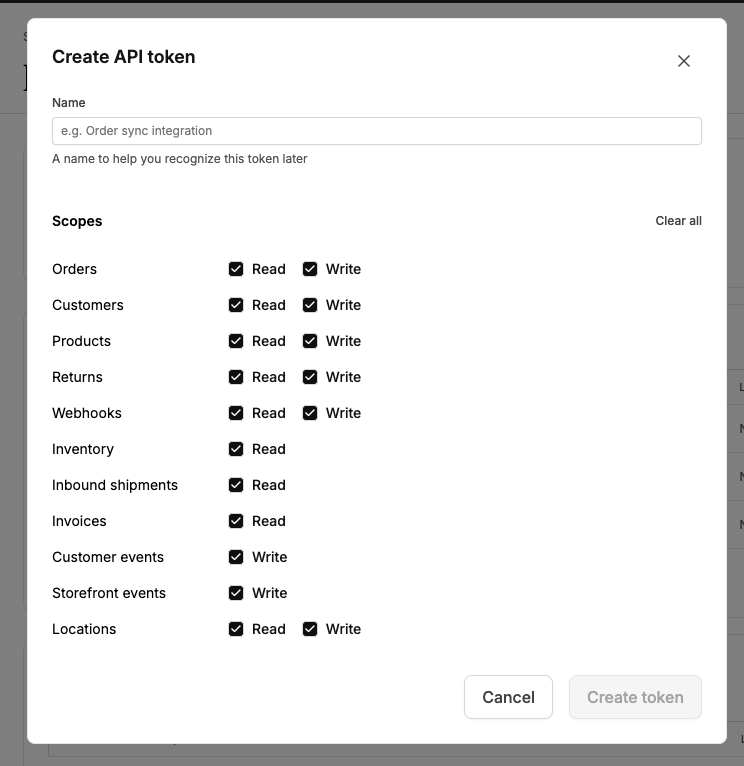
Click Add API Client and fill in the fields.
Reference. Enter
TB.Bearer Token. Create your own secure token, 8 to 32 characters long. Save it somewhere safe, you'll share it with us in Step 3.
Scopes. Turn on every scope, and choose Read and Write wherever both are offered. That covers Orders, Customers, Products, Returns, Webhooks, Inventory, Inbound shipments, Invoices, Customer events, Storefront events and Locations.
Click Save.
Step 2. Find your Store ID
Stay on the Developer page in Redo.
Look at the web address in your browser. The number right after
stores/is your Store ID.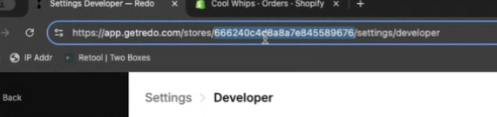
Step 3. Send both to Manifest
Share the bearer token and Store ID with your Manifest Implementation Manager.
What happens next
We'll create the Redo integration in Two Boxes, which generates the webhook secret for your connection, then run a test return with you to confirm returns are flowing through. We'll let you know once it's live.
Related
Redo support: support@getredo.com