Mis-Shipments & Chargebacks: How to Report and What to Expect
Last updated: November 12, 2026
If your customer received the wrong item, the wrong quantity or someone else's order, that's a mis-shipment, not a return. Mis-shipments are rare, but when we get one wrong we want to make it right. This guide shows you how to check whether an order is eligible for a remedy, report it, take care of your customer, and what happens while we investigate. It also covers chargebacks from retailers on wholesale orders.
The process has four parts:
Check the order is eligible.
Gather photos and order details.
Report it through the Mis-Shipment form.
Take care of your customer, and we reimburse you if the investigation confirms the error or can't rule it out.
Who does what
You: check eligibility, report the mis-shipment with photos, create any re-shipment order and return label, and tell your customer what's happening.
Manifest: investigates every report, shares the finding on your form thread, and credits approved reimbursements on your next invoice.
Your Account Manager: answers questions about eligibility or a finding.
When to use this guide
Your customer received the wrong item.
Your customer received too many or too few of an item.
Your customer received someone else's order.
A retailer charged you back or fined you for a wholesale order we shipped.
When not to use this guide
Situation | Use instead |
|---|---|
The box arrived empty, damaged, or never arrived | |
Your customer wants to send back an order that shipped correctly | |
The order arrived later than expected |
Before you start
Have the order number as it appears in ShipHero and the SKUs involved.
Ask your customer for clear photos of what they received, next to the packing slip or shipping label if possible.
Check when the order was delivered. D2C reports must be made within 15 days of delivery.
For a retailer chargeback, have the retailer's chargeback documentation.
1. Check the order is eligible
These remedies apply to direct-to-consumer (D2C) orders we fulfilled. Retailer chargebacks are covered further down.
Mis-shipment type | What happened | Eligible when | Remedy |
|---|---|---|---|
Wrong Item | Your customer received the wrong item or items | Delivered within the last 15 days, and photos clearly show the wrong items compared with the order in ShipHero | We reimburse a re-shipment of the correct items and a return label for the wrong ones |
Wrong Quantity | Your customer received too many or too few of an item | Delivered within the last 15 days, and photos clearly show the wrong quantities compared with the order in ShipHero | We reimburse a re-shipment of the missing quantity, and a return label for any extra units |
Labeling Error | Your customer received someone else's order | Delivered within the last 15 days, and photos clearly show the wrong order compared with the order in ShipHero | We reimburse a re-shipment of the correct order and a return label for the wrong one |
Empty box or mailer | The package arrived with nothing inside | Photos show the empty box or mailer | Not a mis-shipment. File it as a Damaged in Transit claim; see Carrier Shipping Claims & How to Submit a Claim |
Every remedy also depends on our investigation finding the mis-shipment Confirmed or Inconclusive. See section 5.
2. Gather photos and order details
Your report needs photos that clearly show what your customer received compared with the order in ShipHero. Good photos show:
every item in the box, with the SKU, size or color visible;
the packing slip or shipping label, so we can match the package to the order;
for a wrong quantity, all the units laid out so they can be counted.
Reports without clear photos can't be investigated.
3. Report it through the Mis-Shipment form
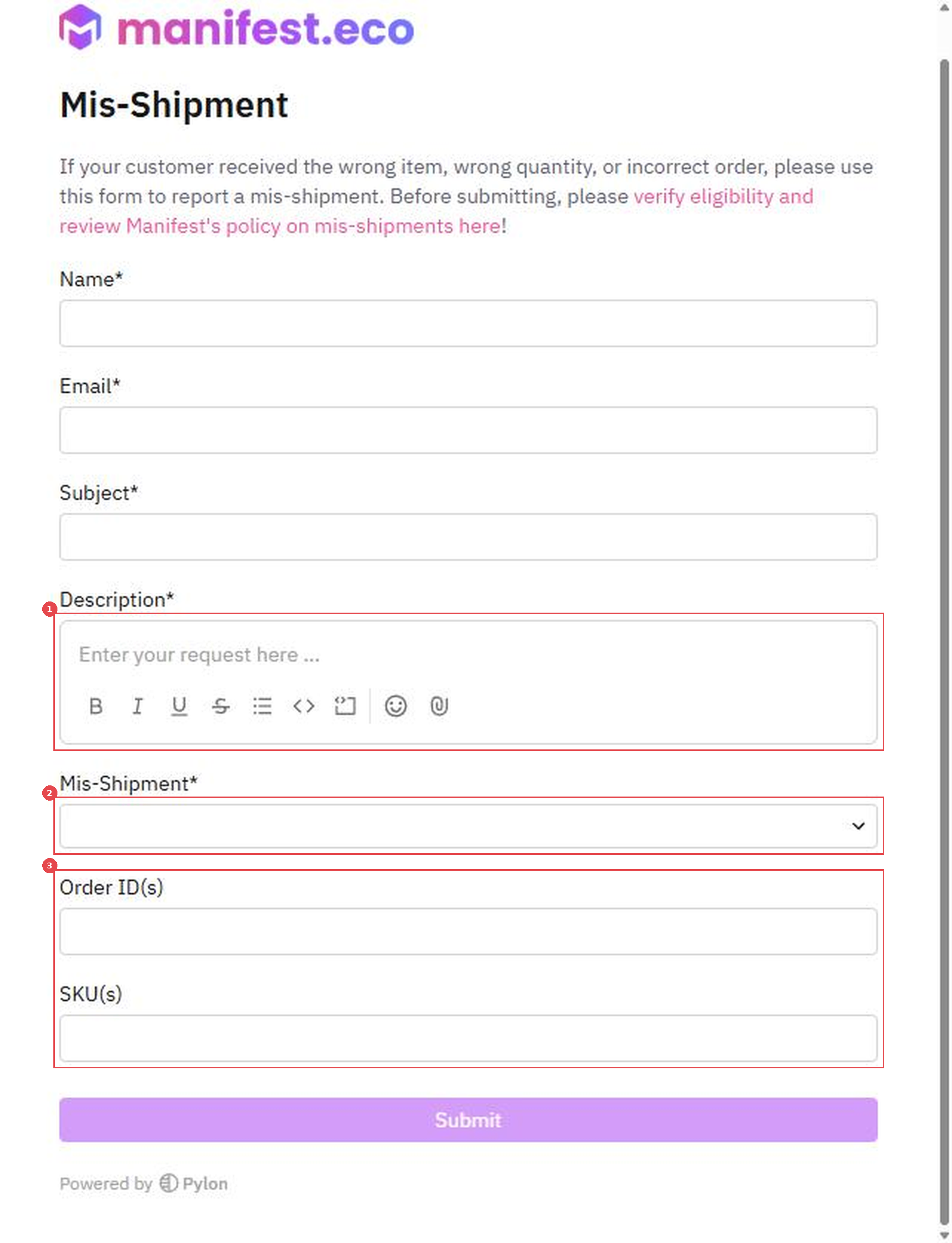
Open the Mis-Shipment form.
Enter your name, email and a subject that includes the order number.
In Description, say what your customer received and what they should have received, and attach the photos with the paperclip icon (1).
In Mis-Shipment, choose Wrong Item, Wrong Quantity, Labeling Error or Retailer Compliance (2).
Enter the Order ID(s) and SKU(s) (3).
Click Submit.
If you won't be sending your customer a return label to recall the wrong items, say so in the description. We'll reimburse the original order's shipping cost instead.
4. Take care of your customer
You don't need to wait for our investigation to look after your customer.
Send the correct items. Create a re-shipment order for the correct items or quantity, on the same shipping method as the original order. See How to Create a Manual Order in ShipHero.
Recall the wrong items, if you want them back. Create a return label for the wrong or extra items. See How to Generate a Return.
International orders
We can't create return labels for international shipments. To recall items from outside the US, create the return label yourself and send us the carrier's invoice with the tracking number so we can reimburse it. If the return costs more than the landed manufacturing cost of the items, we reimburse the landed cost instead, once you send us your manufacturer's invoice showing it.
5. What happens next
We start an investigation as soon as your report comes in. We review pack station video where it's available and every ShipHero log for the order, and the finding goes to our warehouse and operations leadership.
Each investigation ends with one of three findings:
Finding | What it means | Remedy |
|---|---|---|
Confirmed | Video or logs show we made the error | Applied if the order is eligible |
Inconclusive | Video and logs can't clearly confirm or rule out the error | Applied if the order is eligible. When we can't tell, we side with you |
Disproven | Video or logs clearly show the order shipped correctly | None |
We share the finding by email on your form submission thread. Approved reimbursements are credited on your next monthly itemized invoice.
Retailer (wholesale) chargebacks
Every retailer has its own compliance requirements, penalties and fees, so we handle each chargeback individually.
Report it through the Mis-Shipment form and choose Retailer Compliance in Mis-Shipment.
Attach the retailer's chargeback documentation. We can't investigate a chargeback without it.
We review everything we have on the order, including:
warehouse video;
ShipHero and RetailReady logs and the order's history in ShipHero;
the retailer's chargeback documentation;
your approved Vendor Compliance SOP for that retailer, if there is one;
the RetailReady setup for that retailer, if the order was packed in RetailReady.
For orders packed in RetailReady, we can send you a compliance audit, logs and images to help you dispute the chargeback with the retailer. As with D2C orders, we take responsibility and provide a remedy when the investigation confirms the error or can't rule it out.
Verify
Our replies, including the finding, come by email on your form submission thread. Keep an eye on it for any questions from our team.
If the remedy was approved, the credit shows on your next monthly itemized invoice.
Things to avoid
Don't wait more than 15 days after delivery to report a D2C mis-shipment. Reports after that aren't eligible.
Don't submit without photos. We can't investigate without seeing what your customer received.
Don't report an empty box as a mis-shipment. It's handled as a Damaged in Transit carrier claim.
Don't treat a mis-shipment as a return. Use the Mis-Shipment form so the error is investigated and you can be reimbursed.
Don't send a chargeback report without the retailer's documentation. It's the first thing we need to investigate.