How Does the Allow Partial Feature Work?
Last updated: October 21, 2026
Allow Partial is an order-level setting in ShipHero that lets an order ship the items that are in stock now, instead of waiting until every item is available. It’s available for D2C orders only. Wholesale and B2B orders aren’t eligible.
Warning: Allow Partial ships items as they’re allocated, not when the order is complete.
Every time units are allocated to the order, those units become a separate shipment, even if it’s just one unit. Units are allocated when new inventory is received or a return is restocked.
Receiving inventory doesn’t guarantee your order ships. Available units are allocated by ShipHero’s order priority, so they may go to other orders first.
An order short on several SKUs can ship in many packages over days or weeks, and each package is picked, packed and shipped on its own.
Only turn on Allow Partial if you’re comfortable with an order shipping in as many packages as it takes to complete it.
What happens when Allow Partial is on
In-stock items ship right away. ShipHero ships whatever inventory is available, even a single unit, without waiting for the rest of the order.
Out-of-stock items are backordered. The remaining items ship automatically, in separate packages, as inventory arrives.
Every partial shipment is its own package. For example, if an order is short 25 units across several SKUs and one unit comes back into stock through a return, that one unit ships on its own. An order can end up shipping in many packages, and each shipment is billed separately.
Only turn on Allow Partial if you’re comfortable with an order shipping in as many packages as it takes to complete it.
Turn Allow Partial on or off for an order
Open the order. Log in to shipsfor.us, click Orders in the left-hand menu, search for the order and click the order number.
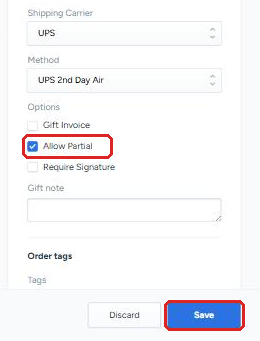
Find the setting. Under Options in the right-hand column, find the Allow Partial checkbox. If it’s already checked, Allow Partial is on for this order.
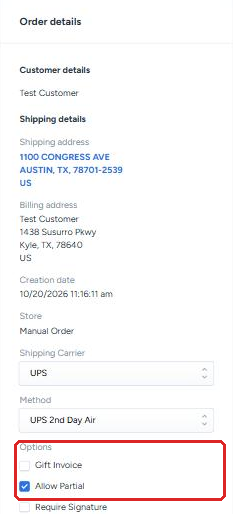
Change it and save. Check the box to turn Allow Partial on, or uncheck it to turn it off. Then click Save in the Unsaved Changes bar at the bottom of the page. Click Discard to cancel instead.
When to use Allow Partial
Use it when getting available items to the customer quickly matters more than shipping everything in one package.
Leave it off when the order should arrive complete, or when the extra packages would cost more than the wait is worth.