How to Edit a Shipping Address on an Order
Last updated: October 21, 2026
You can edit the shipping address on an order in your ShipHero portal at shipsfor.us or in Shopify, as long as the order has not been picked yet. Once an order has been picked, it can’t be edited. Contact your Account Manager for help.
Option 1: Edit the address in ShipHero
Find the order. Log in to shipsfor.us and click Orders in the left-hand menu. Search for the order by order number, or by the customer’s first or last name, and click the order number to open it.
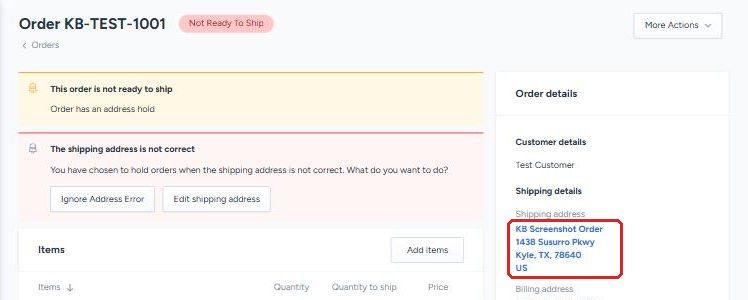
Open the address. Under Shipping details on the right side of the order, click the shipping address. It appears as a blue link.
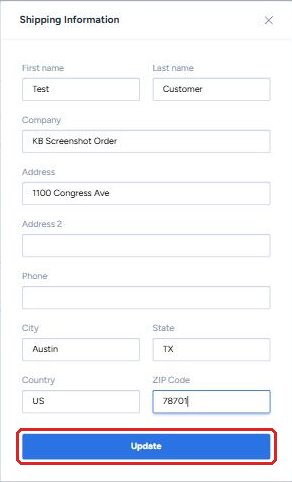
Update the address. Edit the fields that need to change, then click the blue Update button.
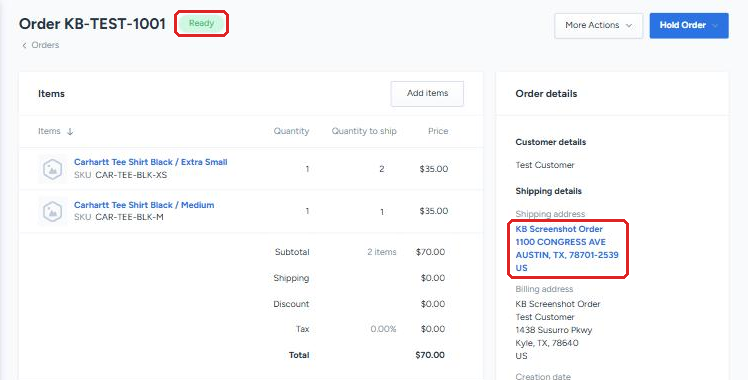
Check the result. The new address appears under Shipping details, and the change is recorded in the order’s History. ShipHero may reformat the address, for example in capital letters or with a ZIP+4 added. That’s expected.
If the order is on an Address Hold
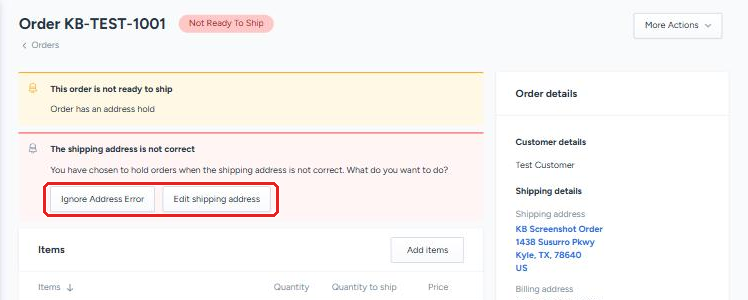
ShipHero places an Address Hold on an order when it can’t validate the shipping address. The order shows a red banner reading “The shipping address is not correct” with two options.
Warning: fixing the address can release the order right away. Once a corrected address passes validation, the Address Hold is removed and the order moves to Ready to Ship. If anything else on the order still needs to change, such as items or shipping method, make those changes first, or put a Client Hold on the order before you edit the address.
Edit shipping address opens the same form as step 3. Once the corrected address passes validation, the Address Hold is removed and the order moves to Ready automatically, so make sure everything else on the order is correct before you save.
Ignore Address Error releases the hold without changing the address. Only use this if you have confirmed with the customer that the address is correct.
Option 2: Edit the address in Shopify
Update the shipping address on the order in your Shopify store. The change syncs to ShipHero automatically, as long as the order hasn’t been picked.