Carrier Shipping Claims & How to Submit a Claim
Last updated: November 12, 2026
Once we hand an order to the carrier, things can still go wrong: a package gets lost, arrives damaged, shows delivered but never turns up, or misses a guaranteed delivery time. For orders that have shipped and have tracking, you can submit a carrier claim and may be reimbursed. This guide shows you which carriers and services are covered, how reimbursement works, which claim types are eligible, and how to submit one.
The process has four parts:
Check the carrier and service are covered.
Find your claim type and check it's eligible.
Understand how you'll be reimbursed.
Submit the Carrier Claim form with the tracking number and any photos.
The claims policy doesn't cover re-shipments or replacement orders. Whether you send your customer a replacement, and at what cost, is your call.
Who does what
You: check eligibility, troubleshoot with your customer where it helps, and submit the claim with tracking and photos.
Manifest: files the claim with the carrier, reimburses Manifest Auto claims up front, and passes on carrier payments for Carrier Approval claims.
Your Account Manager: answers questions about eligibility or a claim decision.
When to use this guide
A package hasn't moved in tracking for 15 days or more.
A package arrived damaged, or arrived as an empty box or mailer.
Tracking shows delivered, but your customer doesn't have it.
A package was delivered to the wrong address, or you think it was stolen.
A package on a guaranteed service arrived after the carrier's guaranteed time.
When not to use this guide
Situation | Use instead |
|---|---|
Your customer received the wrong item, the wrong quantity or someone else's order | Mis-Shipments & Chargebacks: How to Report and What to Expect |
The order hasn't shipped yet | |
The order shipped through OpenBorder or Zonos | Contact OpenBorder or Zonos. Their own claims policies apply. See Manifest x OpenBorder International Shipping |
You want more than $100 of coverage on future high value orders |
Before you start
Have the order number as it appears in ShipHero, the tracking number and the carrier.
Check that the order shipped within the last 30 days. Older orders aren't eligible for any claim type.
For damage, ask your customer for photos of the damaged box or mailer and the damaged items.
1. Check the carrier and service are covered
These services aren't eligible for a claim, whatever happened:
Carrier | Service |
|---|---|
DHL | Parcel Ground (under 1 lb and over 1 lb) |
DHL | International Packet |
DHL | International Standard |
USPS | First Class Package International |
Every other domestic and international carrier and service on your rate card is eligible. Rate shop methods can pick any service in their group, so check which service the package actually shipped on in the tracking details.
2. Find your claim type and check it's eligible
Every claim type needs an eligible carrier and service, and an order that shipped in the last 30 days.
Claim type | Also eligible when | Coverage |
|---|---|---|
Lost in Transit | No tracking event for 15 days or more, and tracking doesn't show delivered | Manifest Auto |
No First Scan | No tracking event after label created, and tracking doesn't show delivered. Treated as lost between our dock and the carrier's facility | Manifest Auto |
Damaged in Transit | Tracking shows delivered, items were damaged in transit, and photos show damage to the box or mailer. An empty box or mailer counts too | Manifest Auto |
Guaranteed Service Delivered Late | The order shipped on a carrier-guaranteed service and was delivered after the guaranteed time | Manifest Auto, shipping cost only |
Delivered to Wrong Address | Tracking shows delivered, and the carrier's proof of delivery photo shows a different location from the order's shipping address | Carrier Approval |
Delivered Not Received | Tracking shows delivered, including "left at door" or "delivered to mailroom", but your customer doesn't have it | Carrier Approval |
Stolen | Tracking shows delivered and you suspect the package was stolen. Handled the same way as Delivered Not Received | Carrier Approval |
Damaged liquids
Leaks, bursts or broken seals aren't eligible unless the photos show the primary packaging itself was damaged in transit, such as a punctured bottle or broken glass.
Which services are guaranteed
Only services the carrier guarantees qualify for a late delivery claim:
UPS: Next Day Air Early, Next Day Air, Next Day Air Saver and 2nd Day Air A.M.
FedEx: First Overnight, Priority Overnight, Standard Overnight and 2Day A.M.
Standard 2-Day services, such as UPS 2nd Day Air and FedEx 2Day, aren't guaranteed. Our reimbursement follows the carrier's guarantee, so a late delivery isn't reimbursed when the carrier has suspended its guarantee, or the delay was caused by weather. For more, see How to Deliver an Order by a Specific Date.
Try these first for Delivered Not Received
Packages that show delivered often turn up. Before you file, ask your customer to:
check with neighbors;
check building mailrooms and common areas;
wait a few days, since carriers sometimes scan a package as delivered days before it physically arrives.
3. Understand how you're reimbursed
Carriers usually take several weeks to approve or deny a claim, and they reimburse the shipper, which is Manifest. How you're paid depends on the coverage type.
Coverage type | How it works |
|---|---|
Manifest Auto | We reimburse you up to $100 in retail value for an eligible claim, whether or not the carrier pays us, and we don't take it back if the carrier denies it. Anything over $100 follows Carrier Approval |
Manifest Auto, shipping cost only | We reimburse the shipping cost of the late package |
Carrier Approval | We pass on what the carrier pays us, if and when it approves the claim |
For example, for an eligible Lost in Transit claim on a $500 order, we credit you $100 up front. If the carrier later approves the claim, we pass on what it pays above $100. If it denies the claim, you keep the $100 and nothing more is paid.
Approved reimbursements are credited on your next monthly itemized invoice.
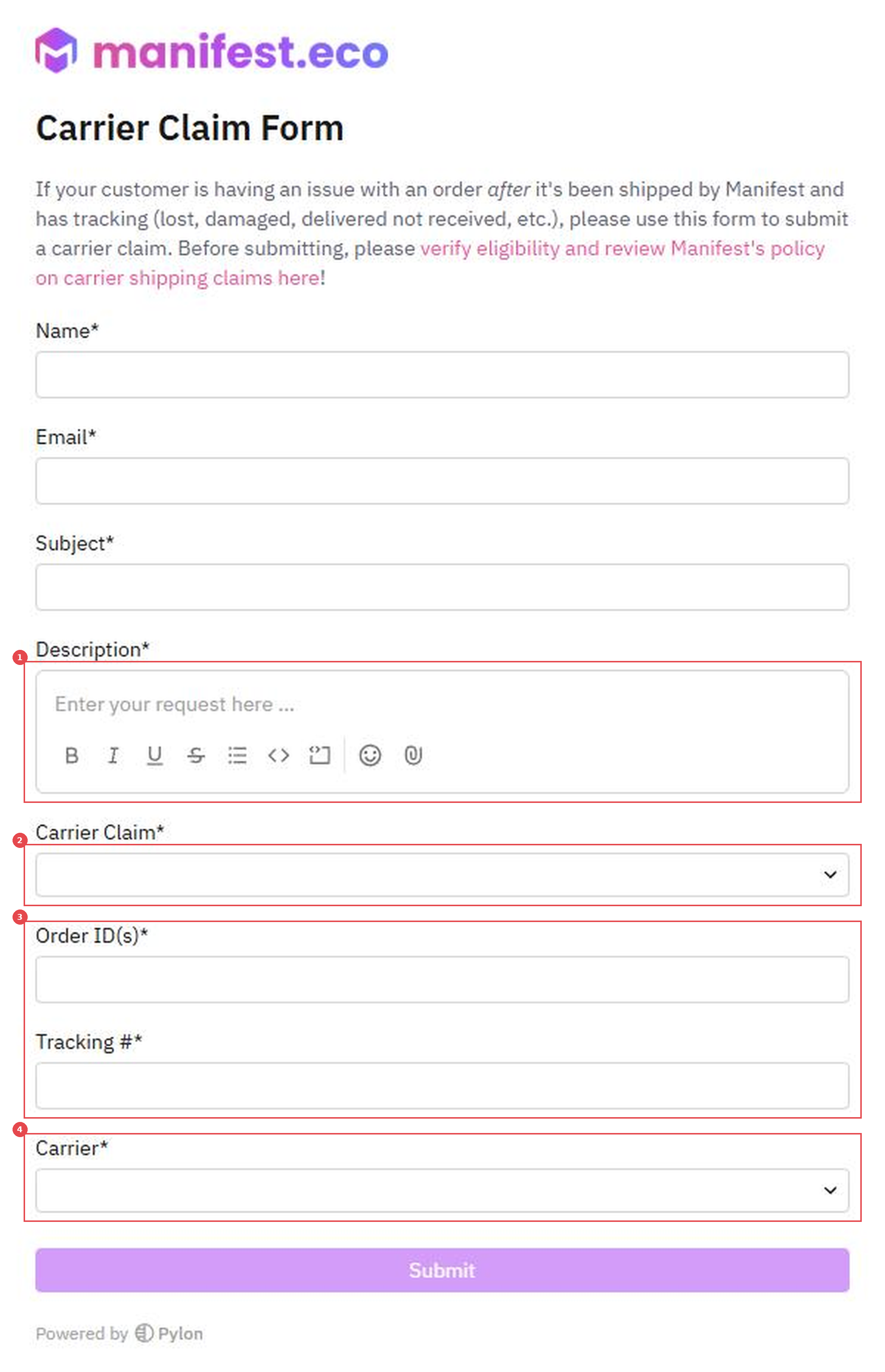
4. Submit the Carrier Claim form
Open the Carrier Claim form.
Enter your name, email and a subject that includes the order number.
In Description, say what happened, and attach any photos with the paperclip icon (1).
In Carrier Claim, choose the claim type (2).
Enter the Order ID(s) and Tracking # (3).
In Carrier, choose the carrier the package shipped with (4).
Click Submit.
Verify
Our replies, including the claim decision, come by email on your form submission thread.
Manifest Auto reimbursements show as a credit on your next monthly itemized invoice. Carrier Approval reimbursements show after the carrier approves the claim and pays us.
Things to avoid
Don't file after 30 days from shipping. No claim type is eligible after that.
Don't file a Delivered Not Received claim straight away. Check with neighbors and mailrooms, and give it a few days first.
Don't file a damage claim without photos of the box or mailer. Without them, the claim isn't eligible.
Don't file a late delivery claim on a standard 2-Day service. Only carrier-guaranteed services qualify.
Don't use this form for a wrong item or wrong quantity. That's a mis-shipment; use the Mis-Shipment form instead.
Don't expect a claim to cover a replacement order. Re-shipments aren't covered by the claims policy.