How to Deliver an Order by a Specific Date
Last updated: November 11, 2026
When an order has to arrive on or before a certain date, two clocks decide whether it makes it: our processing time to get a label on the package, and the carrier's time in transit. This guide shows you how to work backward from your deliver-by date, pick a shipping service that covers the gap, and set it on the order before it's picked.
The process has four parts:
Make sure the order is Ready to ship, because our clock doesn't start until it is.
Work out the day we'll create the label.
Count the business days left and choose a service that covers them.
Change the shipping method on the order.
Who does what
You: confirm the order is Ready, choose the shipping service and set it on the order before it's picked.
Manifest: processes the order within our SLA and ships it on the service set on the order.
Your Account Manager: handles expedited processing requests when our standard SLA can't make your date, and answers questions about services and charges.
When to use this guide
A customer, retailer or event needs an order by a specific date.
You want to know whether an order already in ShipHero will arrive in time on its current shipping method.
You're choosing between a faster service and a cheaper one for a time-sensitive order.
When not to use this guide
Situation | Use instead |
|---|---|
Our standard processing time is too slow for your date, even with overnight shipping | |
You're collecting the order from the warehouse yourself | |
The order ships on a prepaid label or BOL from your retailer or marketplace, so they control the service | |
You need every order from your store to arrive by a holiday | |
You want to change the default shipping method for all future orders |
Before you start
Have the order number and the exact deliver-by date, including the day of the week.
Know whether the order is D2C or B2B. Our Manifest SLAs & Turnaround Times guide defines each order type and its processing time.
Check that the order hasn't been picked yet. Once it's picked, the shipping method can't be changed.
If it's November or December, check this year's 2026 Manifest Holiday Shipping Guide. Our SLAs are extended during peak season, and carriers stretch their own delivery times.
1. Confirm the order is Ready to ship
Our SLA counts from the moment an order becomes Ready to ship, not from when it was imported. An order that's backordered, on hold or, for B2B, missing its labels or documents doesn't start the clock, no matter when it arrived in ShipHero.
Log in to your ShipHero portal at shipsfor.us, click Orders (1) in the left-hand menu, then click Orders again in the menu that opens.
Search for the order number (2), or click the Ready To Ship tab to see every order that's ready.
If the order doesn't appear, click Filters (3), change Created Date to a wider range such as in the last month, and click Apply. The list shows only the last week by default.
Check that the order's Status reads Ready (4).
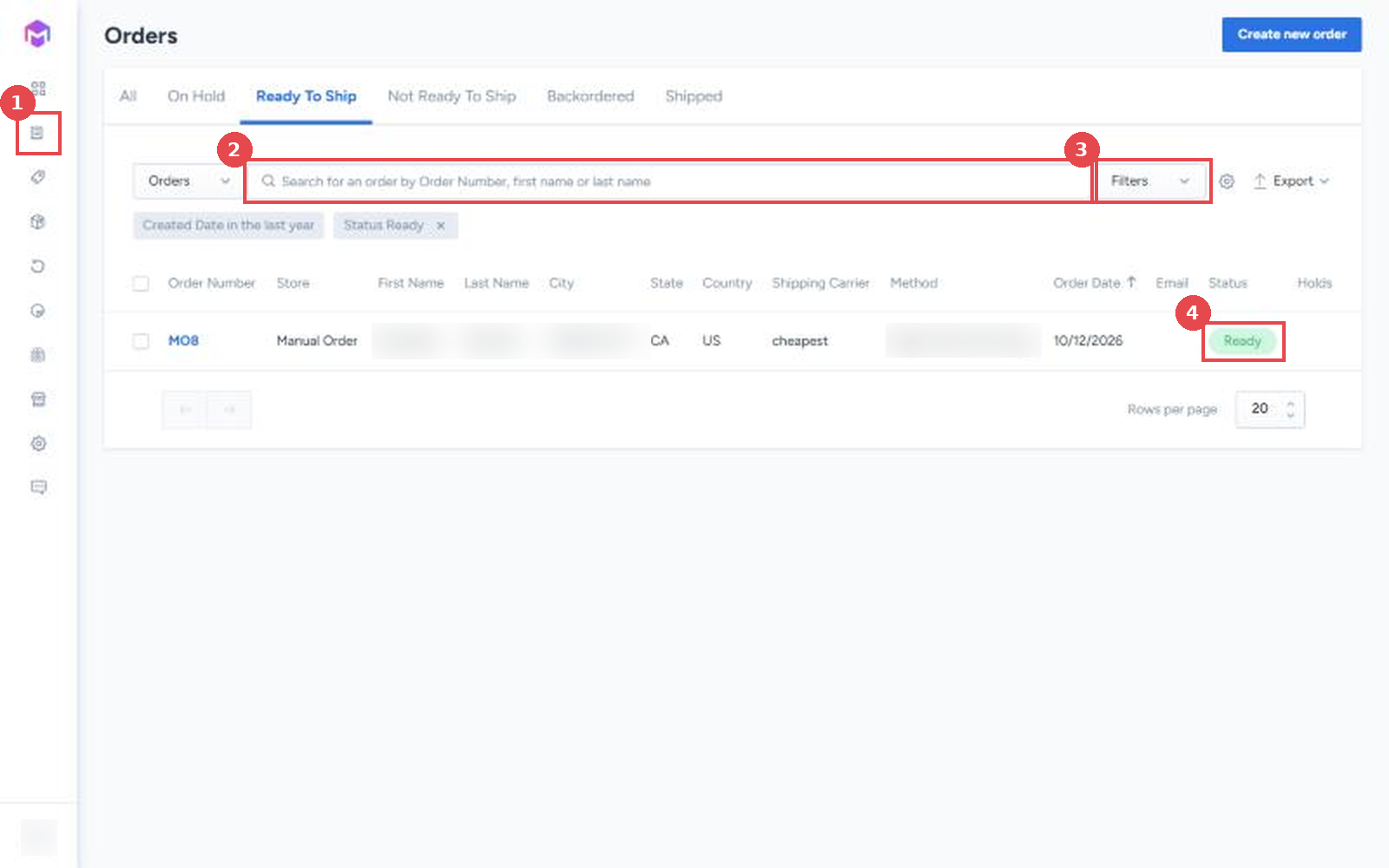
If the order shows Not Ready, On Hold or Backordered, fix that first. See Order Page Terms & Statuses and How to Manage Order Holds. For B2B orders, attach any carton, pallet or unit labels and documents now; see How to Add Attachments to an Order.
2. Work out when we'll create the label
Start from the day the order became Ready
The day an order becomes Ready is Day Zero for our SLA. If you made the order Ready yourself, for example by releasing a hold or attaching B2B labels, you know when that happened. If you're not sure whether a D2C order became Ready before or after 12:00 pm CT, plan as if it was after.
Add the processing time
Use the Manifest SLAs & Turnaround Times guide for your order type.
Order type | Label created by |
|---|---|
D2C, Ready before 12:00 pm CT on a business day | End of that same business day |
D2C, Ready after 12:00 pm CT, or on a weekend or holiday | End of the next business day |
B2B or FBA Prep | End of the last SLA day, counting business days from the day after it became Ready |
Count business days only. Weekends and holidays don't count toward our SLA or toward most carriers' transit times. During peak season, add the extension listed in the 2026 Manifest Holiday Shipping Guide.
Allow for carrier pickup
Creating the label isn't the same as handing the package to the carrier. Depending on when the carrier's pickup happens that day, a package with a label created today can leave with the next business day's pickup. To be safe, treat the business day after we create the label as the day the package leaves our warehouse.
3. Choose a service that covers the gap
Count the business days between the day the package leaves our warehouse (the business day after we create the label) and your deliver-by date. That's the transit time the carrier has. Then pick a service that delivers within it.
Guaranteed and estimated services
Carriers sell two kinds of service. A guaranteed service commits to a delivery day, and in some cases a time; if it's late, the shipping cost can be refunded. Every other service gives an estimate only, and a late package isn't eligible for a refund.
Service | Typical transit | Delivery commitment |
|---|---|---|
Overnight: FedEx Standard Overnight, UPS Next Day Air, UPS Next Day Air Saver | 1 business day | Guaranteed by the carrier |
2-Day: FedEx 2Day, UPS 2nd Day Air, FedEx One Rate 2Day | 2 business days | Estimate only, unless the carrier guarantees that service. FedEx and UPS currently guarantee only their 2Day A.M. and 2nd Day Air A.M. services. |
Expedited and 3-Day: USPS Priority Mail, UPS 3 Day Select, FedEx Express Saver, DHL Expedited | 1 to 3 business days | Estimate only |
Ground and economy: everything else | 2 to 8+ business days | Estimate only |
To check transit time from our warehouse to a specific ZIP code, use the carrier's own tool, such as UPS Calculate Time and Cost, with origin ZIP 78666.
If the date matters, choose a guaranteed service. An estimated service usually arrives on time, but nothing backs it when it doesn't, and late deliveries are most likely in exactly the weeks when dates matter most.
Worked examples
D2C order, deliver by Friday. The order became Ready on Wednesday at 10:00 am CT, before the noon cutoff, so we create the label by end of day Wednesday. Allowing for pickup, it leaves our warehouse by Thursday. That leaves one business day, so choose an overnight service. If the order had become Ready after noon on Wednesday, the label would be created Thursday and the package could leave Friday, so Friday delivery would no longer be safe.
B2B Standard order, deliver by the following Tuesday. B2B Standard orders ship on a prepaid label or BOL, so the service is chosen when the label is bought, not in ShipHero. The order became Ready on Tuesday, which is Day Zero. With a 3 business day SLA, it's ready to ship by end of day Friday. Allowing for pickup, it leaves our warehouse by Monday, since carriers don't count the weekend. The prepaid label needs an overnight service to deliver Tuesday.
Saturday delivery is only available on select services, so plan on a package that leaves our warehouse on Friday arriving Monday at the earliest. If you need Saturday delivery, contact your Account Manager before the order is picked.
4. Change the shipping method on the order
Set the service you chose on the order before it's picked. Choose a specific carrier and service, not a rate shop method, so you know exactly what it ships on. Full steps are in How to Edit the Shipping Method on an Order.
Open the order and find Shipping Carrier and Method under Order details.
In Shipping Carrier, select the carrier, for example FedEx. Method resets when the carrier changes.
In Method, select the service, for example FedEx Standard Overnight.
Click Save in the Unsaved Changes bar.
Don't pick Cheapest - Overnight. It's an empty ShipHero option and won't ship the order on an overnight service.
For a B2B order on a prepaid label or BOL, leave Shipping Carrier set to Generic and choose the service when the label is bought instead. See Shipping Types at Manifest.
The new service is billed at your rate card price for that carrier and service. See Your Manifest Rate Card.
5. Verify
Reopen the order and check that Shipping Carrier and Method show what you selected. The change is also recorded in History.
After the label is created, open the tracking number. The carrier's scheduled delivery date should be on or before your deliver-by date.
If the order hasn't shipped by the day you expected, see Why Hasn't My D2C Order Shipped Yet? or Why Hasn't My B2B Order Shipped Yet?.
If a guaranteed order arrives late
If a package on a guaranteed service arrives after the carrier's committed delivery time, you can claim back the shipping cost. Submit it within 30 days of shipping through the claim form in Carrier Shipping Claims & How to Submit a Claim, under Guaranteed Service Delivered Late.
Carriers don't refund delays caused by weather, natural disasters or an incorrect address, and they sometimes suspend or narrow their guarantees during peak season. Our reimbursement follows the carrier's guarantee, so a late delivery isn't reimbursed when the carrier has suspended its guarantee or the delay was caused by weather.
Things to avoid
Don't count from the order's import time. Our SLA starts when the order becomes Ready. An order imported Monday that sits backordered until Wednesday starts its clock on Wednesday.
Don't treat the label date as the ship date. A package can leave with the next business day's carrier pickup, so build in that extra day.
Don't count weekends or holidays. Neither our SLA nor most carrier transit times include them, so a "2-day" service shipped Thursday usually arrives Monday.
Don't leave a time-sensitive order on a rate shop method. Rate shopping picks the lowest cost service in the group at label time, which may be a slower one than you're expecting.
Don't rely on an estimated service for a hard date. Ground and economy services usually arrive on time, but a late package can't be refunded.
Don't change the method after the order is picked. By then it's too late to change in ShipHero; contact your Account Manager instead.
Don't use Cheapest - Overnight. It's an empty option in ShipHero and won't produce an overnight label.
Don't plan with off-peak timing in November and December. Our SLAs are extended and carriers add time; use the holiday guide's cutoff dates instead.