How to Re-Ship an Order
Last updated: October 19, 2026
If an order has already shipped and needs to go out again, you can request a re-ship directly from the order in your ShipHero portal at shipsfor.us. This reopens the order so Manifest's warehouse team can pick, pack and ship the items again.
When to re-ship an order
Common reasons include:
The package was lost in transit
The package was returned to sender
The customer received a damaged item
An item was missing from the original shipment
How to re-ship an order
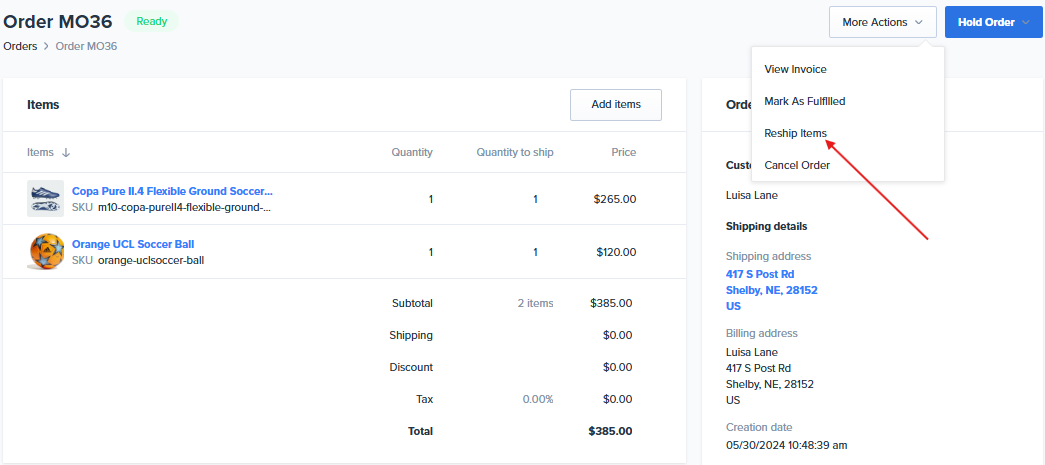
Log into your ShipHero portal at shipsfor.us and open the order you need to re-ship.
Click the More Actions tab.
From the dropdown menu, click Reship Items.
Select the items and quantities you want to re-ship, then confirm.
Things to know
Check the address first. If the original package was lost or returned to sender, confirm the shipping address on the order is correct before re-shipping it.
Inventory: Re-shipped items are picked from your inventory like any other order, so make sure you have stock available for the items you're re-shipping.
Need help? If you're not sure whether to re-ship or have questions about a specific order, contact Manifest's account managers.