Uploading Your Retailer Onboarding Files
Last updated: November 6, 2026
Before RetailReady can set up your retailer connection, it needs the retailer's routing guide and examples of the labels and documents the retailer requires. You upload these once per retailer, in your connection's onboarding checklist.
You'll need your RetailReady login first (see Your RetailReady Account: First Login and New Brand Checklist).
Upload your files
Click Connections in the left menu and open the connection for this retailer.
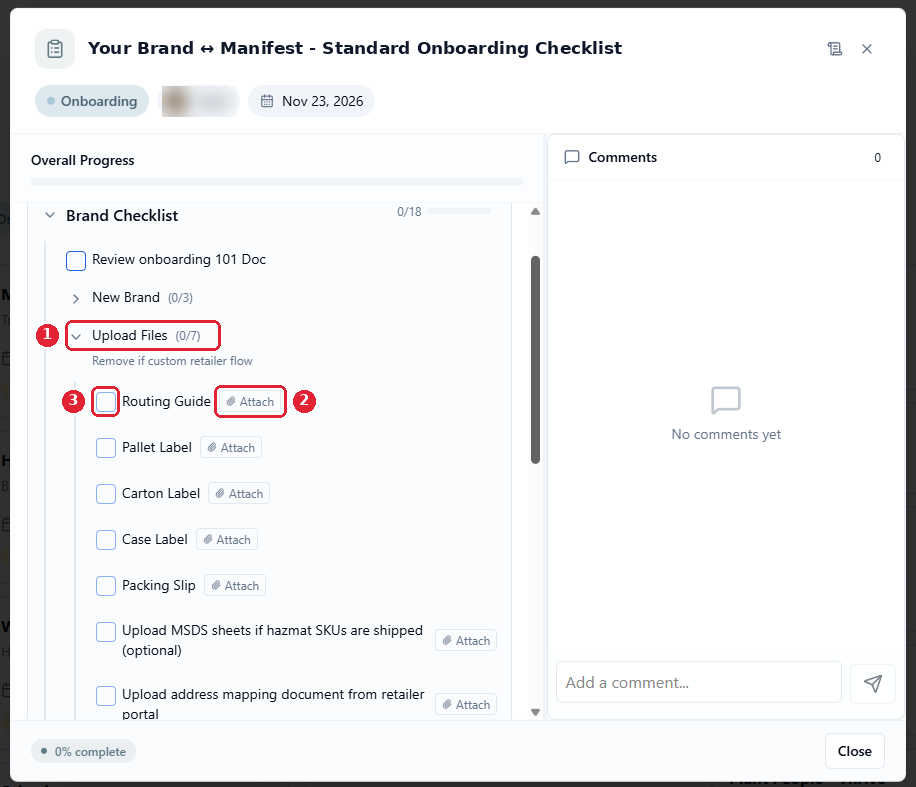
In the Brand Checklist, expand Upload Files (1).
Click Attach (2) next to each item and upload the file.
Tick the checkbox (3) once the file is uploaded.
If an item doesn't apply to this retailer, tick it anyway and add a comment in the Comments panel saying why (for example "Parcel only, no pallet labels"). A ticked item tells everyone you've reviewed it; the connection can't go live until every item is ticked.
What to upload
Checklist item | What it is | Notes |
|---|---|---|
Routing Guide | The retailer's vendor or supplier compliance manual | Upload the latest version. |
Pallet Label | A sample pallet label | Freight only. Not needed for parcel-only retailers. |
Carton Label | A sample of the label that goes on each shipping carton (often a GS1-128 or SSCC label) | Usually in the routing guide. A photo or PDF is fine. |
Case Label | A sample of the label on your master cases | Not needed if your cases don't carry one. |
Packing Slip | The retailer's required packing slip layout | |
MSDS sheets | Safety data sheets | Optional. Only if you ship hazmat SKUs. |
Address mapping document | The retailer's list of DC or store numbers and addresses | Only if the retailer provides one in its portal. |
PDFs work best. Use the retailer's own documents rather than screenshots wherever you can.
Carton and pallet labels are built from your GS1 company prefix. No prefix? We can still set up your connection, but if your retailer needs carton labels built from your own prefix, you'll need one before your first shipment. See Your GS1 Company Prefix: What It Is and How to Get One.
If the retailer updates its routing guide later
Send the new version to your Manifest Implementation Manager. RetailReady reviews updated routing guides and adjusts the setup, which can take up to two weeks, so send it as soon as you get it.
Questions
Contact your Manifest Implementation Manager. RetailReady's Onboarding 101 guide explains the onboarding checklist in more detail.