Your GS1 Company Prefix: What It Is and How to Get One
Last updated: November 6, 2026
Most retailers require a GS1-128 carton label (also called an SSCC label) on every carton you ship them, and often on every pallet. RetailReady prints these labels for us, but it builds each one from your GS1 Company Prefix. Without a valid prefix, we can't print compliant labels, and non-compliant labels lead to chargebacks.
This guide explains what the prefix is, how to check whether you have one, and how to get one if you don't.
What is a GS1 Company Prefix?
It's a number GS1 licenses to your company that identifies you as the brand owner. It's the first part of every UPC you've created through GS1, and it's also the first part of every carton label (SSCC) printed for your shipments.
Each carton label carries an 18-digit SSCC that starts with your prefix, followed by a serial number unique to that carton. That's how the retailer knows the carton came from you.
Do I already have one?
You probably do if:
You bought a GS1 Company Prefix from GS1 US (you'll have a myGS1 US account and pay an annual renewal), or
You have an older U.P.C. Company Prefix certificate from GS1 US (formerly the Uniform Code Council).
You probably don't if:
You bought single GTINs from GS1 US (the one-time, per-barcode option). These give you UPCs but not a prefix, and they can't be used for carton labels.
You bought UPCs from a third-party barcode reseller. Those UPCs aren't licensed to your company, so they don't give you a prefix.
How to check
Go to the GS1 Company Database.
Search for one of your product UPCs, or your company name.
Check the result:
Your company name comes back with a GS1 Company Prefix: you have one. Note the prefix exactly as shown.
Another company's name comes back, or nothing is found: the UPC isn't licensed to you, and you'll need your own prefix.
If you have a myGS1 US account, you can also log in and find your prefix on your account.
How to get one
Go to the GS1 US Store and choose a GS1 Company Prefix (not single GTINs). Prefixes are sold in tiers by how many products you need to barcode; pick a tier that covers your current SKUs plus new products you plan to launch in the next year or two.
Enter your company details and pay. GS1 US sends a welcome email with access to your myGS1 US account, where you'll find your prefix.
Pay the annual renewal on time. If the license lapses, your company drops out of the GS1 Company Database and retailers can't verify your barcodes.
Your prefix should show up in the GS1 Company Database within about a day. Start this as early as you can if your retailer needs carton labels built from your own prefix.
No prefix yet?
No prefix? We can still set up your connection. The GS1 Prefix field (1 and 2) is required to save the connection (3), so we enter RetailReady's placeholder, 123456, until you have your own. If your retailer needs carton labels built from your own prefix, you'll need one before your first shipment.
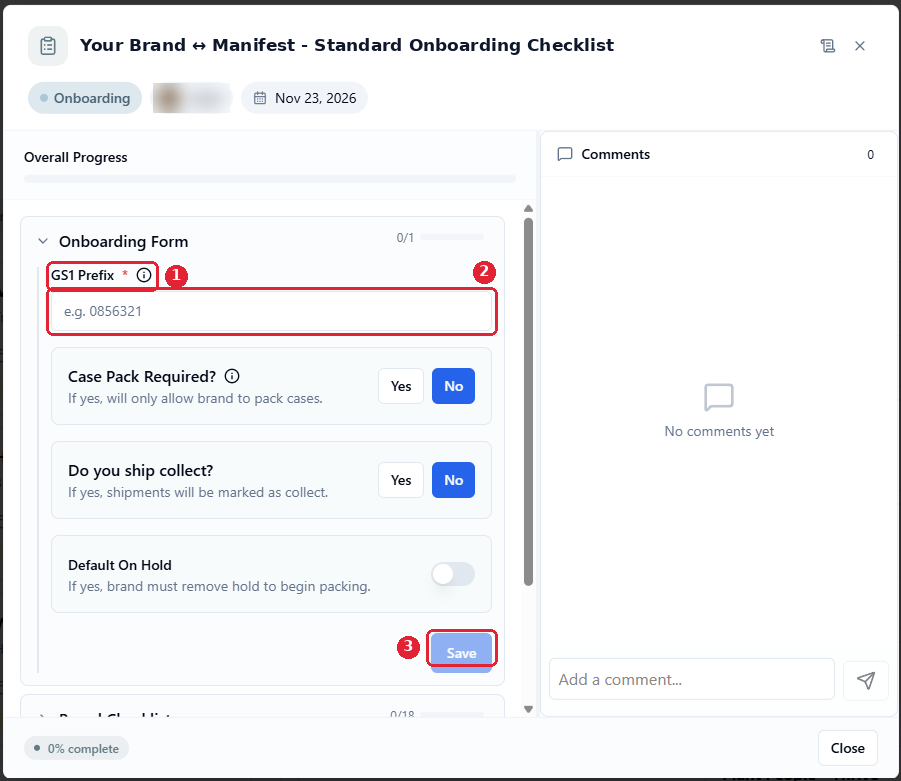
Enter your prefix in the Manifest retailer intake form, or send it to your Manifest Implementation Manager. Copy it exactly as GS1 shows it, including any leading zeros. It prints on every carton label for every retailer, so one wrong digit affects every shipment.
If you only have an older U.P.C. Company Prefix certificate, send us that number and we'll confirm the right format with you.
What's next
Once your connection is set up, you can work through your Brand Checklist: see Your RetailReady Account: First Login and New Brand Checklist and Uploading Your Retailer Onboarding Files.
Questions
Contact your Manifest Implementation Manager. GS1 US has more detail in What is a Company Prefix? and Serialized Shipping Container Codes (SSCC).