Shopify Draft Order- Shipping Option Selection
Last updated: June 2, 2026
Overview
When creating a draft order in Shopify, it’s critical to select a mapped shipping rate before the order is completed.
If a draft order is created without a valid, mapped shipping rate, the order will still import into ShipHero but it may do so with a Generic Label or unmapped shipping method, which can lead to fulfillment delays, incorrect carrier selection, or manual intervention by our team.
This guide explains why this happens and how to prevent it.
Required Steps When Creating a Shopify Draft Order
When creating or completing a draft order in Shopify, please ensure the following:
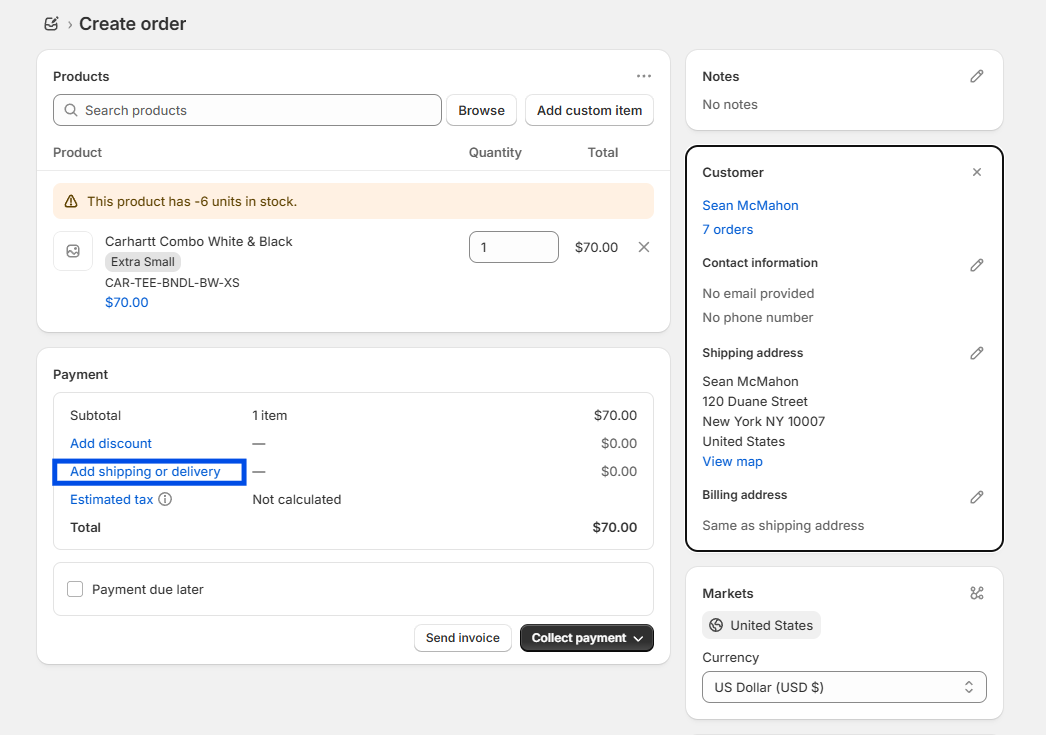
Select Add shipping and delivery
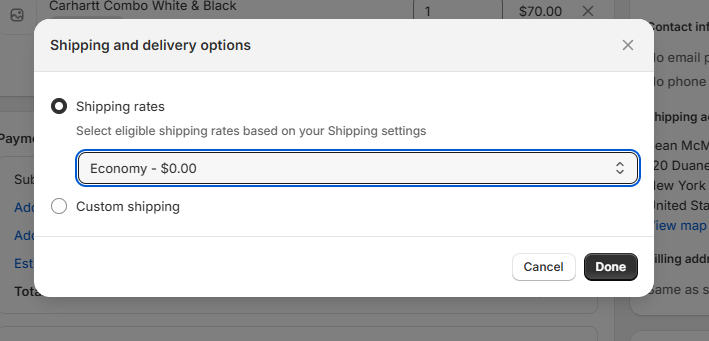
- Ensure that a "Shipping rate" is selected from the dropdown. Using a custom shipping rate will result in the order importing into ShipHero with an unmapped shipping method, which can cause fulfillment delays or require manual intervention.
What Happens If a Mapped Rate Is Not Selected
If a draft order is completed without a mapped shipping rate, one of the following may occur:
The order imports into ShipHero with Generic Label
The order cannot be auto-fulfilled
Our operations team must manually update the shipping method
Fulfillment may be delayed while the issue is corrected