ShipHero: How Cancelling Orders Affects Shopify
Last updated: November 13, 2026
How you cancel an order in your ShipHero portal decides what happens to it in Shopify. One way cancels it in both systems. Another stops us shipping it but leaves it open in Shopify. This guide shows what each way does, so you can pick the one that matches what you want for the order.
Who does what
You: choose how to cancel, cancel before the order is picked, and handle the customer email and any refund in Shopify.
Manifest: stops shipping any order that's canceled in ShipHero before it's picked.
Your Account Manager: helps when an order may already be in progress at the warehouse.
When to use this guide
You're about to cancel an order in ShipHero and want to know what happens in Shopify.
An order shows Canceled or Fulfilled in ShipHero but still looks open in Shopify, or the other way round.
You want Manifest to stop shipping an order but keep it open in Shopify.
When not to use this guide
Situation | Use instead |
|---|---|
You want the step-by-step instructions to cancel | |
You only want to remove one item | |
You want to cancel in Shopify instead | |
The order has already shipped |
Before you start
Open the order in your ShipHero portal at shipsfor.us and check it hasn't been picked. Once it's picked, it can't be canceled. A yellow banner at the top of the order means the warehouse is already working on it, so contact your Account Manager right away instead. See How to Contact Manifest Account Management.
1. Choose how to cancel
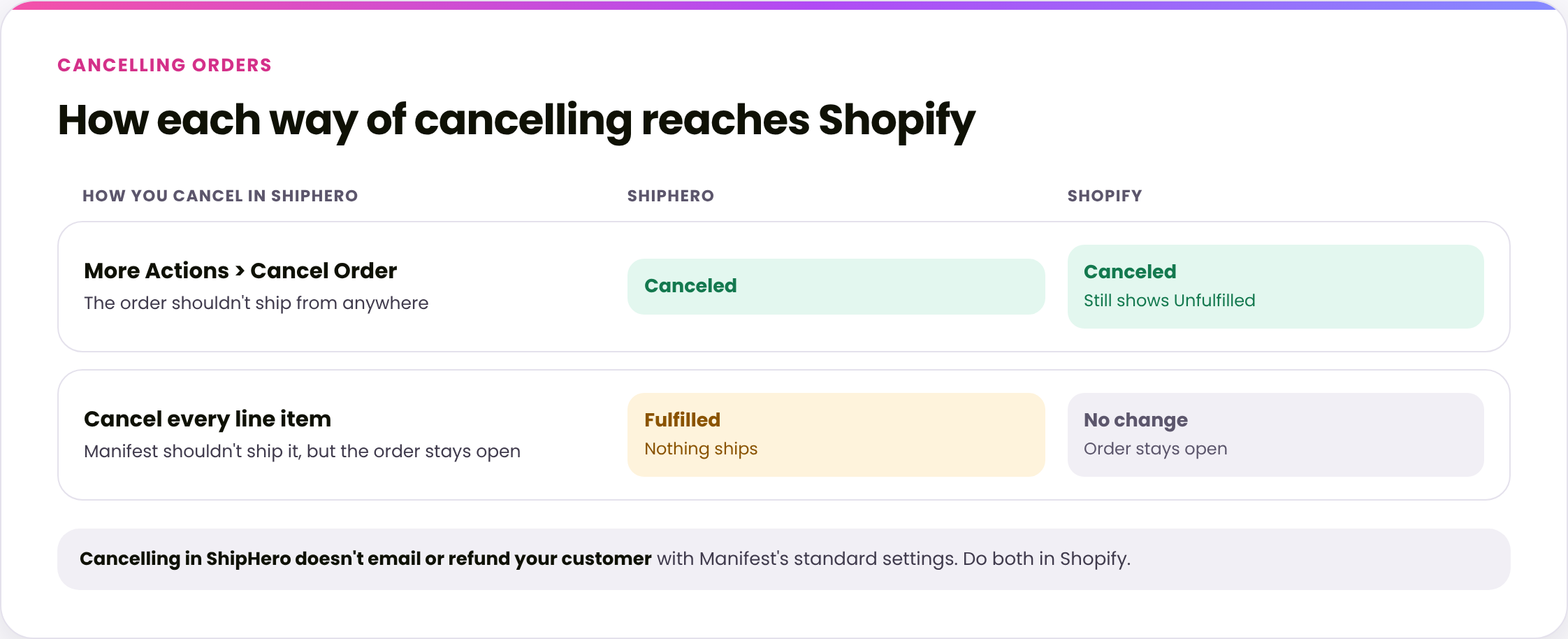
The order shouldn't ship from anywhere: use More Actions > Cancel Order. The order is canceled in both ShipHero and Shopify, though Shopify still shows it as Unfulfilled.
Manifest shouldn't ship it, but the order should stay open in Shopify, for example because you'll fulfill it from another location: cancel every line item in ShipHero. The order shows Fulfilled in ShipHero, but nothing ships, and nothing changes in Shopify.
2. Cancel in both ShipHero and Shopify
Use More Actions > Cancel Order on the order. See How to Cancel an Order for the steps.
The order is canceled in Shopify too, but still shows as Unfulfilled there. That's expected.

3. Stop Manifest shipping it, but keep it open in Shopify
Cancel each line item on the order in your ShipHero portal. See How to Remove an Item from an Order. Once every item is canceled, the order shows Fulfilled in ShipHero. That's expected: nothing ships, and nothing changes in Shopify.


If you're fulfilling the order from another location, you can also move it in Shopify instead: open the order, click the location name on the Unfulfilled section and choose Change location. If every item moves away from Manifest Texas before we start picking, the order is closed in ShipHero automatically. See Shopify x ShipHero- Import Orders by Location Flag.
4. After you cancel
Your customer isn't emailed. With Manifest's standard settings, cancelling in ShipHero doesn't trigger a Shopify email to your customer. Letting them know is up to you.
Refunds happen in Shopify. Review the order in Shopify and issue any refund there.
Canceled by mistake? Contact your Account Manager. An order canceled with Cancel Order can usually be reopened in ShipHero. One closed by cancelling every line item has to be re-shipped instead.
Verify
In your ShipHero portal, every item's quantity to ship is 0, and the order shows Canceled, or Fulfilled if you canceled every line item.
In Shopify, the order shows what you expected from step 1: canceled, or unchanged.
Things to avoid
Don't use Cancel Order if you still plan to fulfill the order elsewhere. It cancels the order in Shopify too.
Don't cancel the line items if the order shouldn't ship from anywhere. It stays open in Shopify and can be fulfilled by mistake.
Don't assume your customer has been told. Cancelling in ShipHero doesn't email them.
Don't wait. Once the order is picked, it can't be canceled.